
The problem you told us about
Until now, all your lending activity was linked to a single bank account. Money you lent went out from that account and borrower repayments came back into the same account. While this worked, it did not suit everyone. Some lenders wanted repayments in the account they use for spending and lending funded from a separate account. Others have accounts across different banks and did not want to move money between accounts before every lending cycle.
What is changed
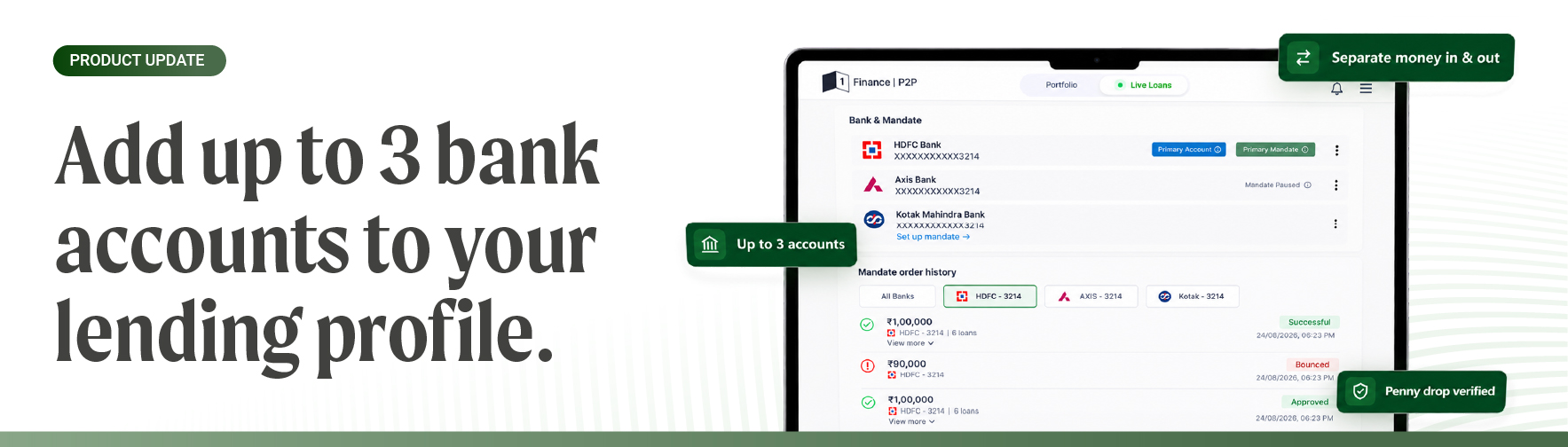
You can now add up to three verified bank accounts to your lending profile. You can assign two roles to these accounts:
- Primary account: Borrower repayments, including principal, interest and prepayments, are credited to this account. Only one account can be primary at a time.
- Funding account: Money is debited from this account when you lend. An active mandate is required to lend from an account.
The same account can be both your primary and funding account. If you prefer using one account for everything, you can continue doing so without making any changes.
To add an account, go to Menu → Bank and mandate → Add bank account and enter your account details.
The account is verified through a penny drop or reverse penny drop. In a penny drop, a small amount is sent to your account and the name is checked against your KYC record. In a reverse penny drop, you send a small amount to us and your account details are read from the transfer. Once verification is successful, the account can be used on your lending profile.
You can then activate a mandate on the account if you want to lend from it and set it as your primary account if you want repayments to be credited there.
Why is this important
You now have more control over how money moves through your lending profile. You can separate the account used for receiving repayments from the account used for lending.
A mandate is required for an account to be used for lending. It gives the platform standing authorization to debit the account when you commit to funding a loan. Without a mandate, each individual lending transaction would need separate approval. If you add an account without activating a mandate, it remains receive-only. You can use it as your primary account and receive repayments. A newly added account becomes available for selection the next day, allowing verification and mandate registration to settle with the bank.
You can change the primary account and funding account once a day. This helps keep repayments and lending transactions routed to the account you intended.
Changing accounts does not affect transactions already in progress. A lending commitment made using your old funding account will still be debited from that account, while a repayment already routed to your old primary account will still arrive there. New transactions after the change will use the new account. Nothing gets stuck or reversed because of the change.
You can add up to three accounts. The limit is designed to make it easier to manage and reconcile your lending activity without making it difficult to track which account funded a loan or received a repayment.
Where to find it
Go to Menu → Bank and mandate. Your existing bank account will already be listed as your primary account. To add another account, tap Add bank account.